
Useful Info
This free tool allows you to upload a list of DBS certificate numbers and check their current statuses in bulk. You can download the results in a CSV. The service is private and secure and no data is saved or shared with anybody. The DBS recipients must be signed up to the “Update Service” for this to work.
- 🆓 This is a completely free service provided by loveIT.
- ✅ No data is stored by this website, your data is not visible to anybody but you.
- 🧑🦰 Users must be signed up to the “DBS Update Service“ for this status check.
- ✉️ Any issues just send a message to us via the Contact Us form and we will aim to resolve as quickly as possible.
DBS Status Checks
Instructions
Update Service and Permission
Before using this service, ensure that:
- Recipients are signed up to the DBS Update Service (free for volunteers)
- Recipients provided permission to you for checking the status of their DBS certificate
Download the CSV template
The upload must be in CSV format. To make this easy, just download the template file with the button below.
Populate the CSV file
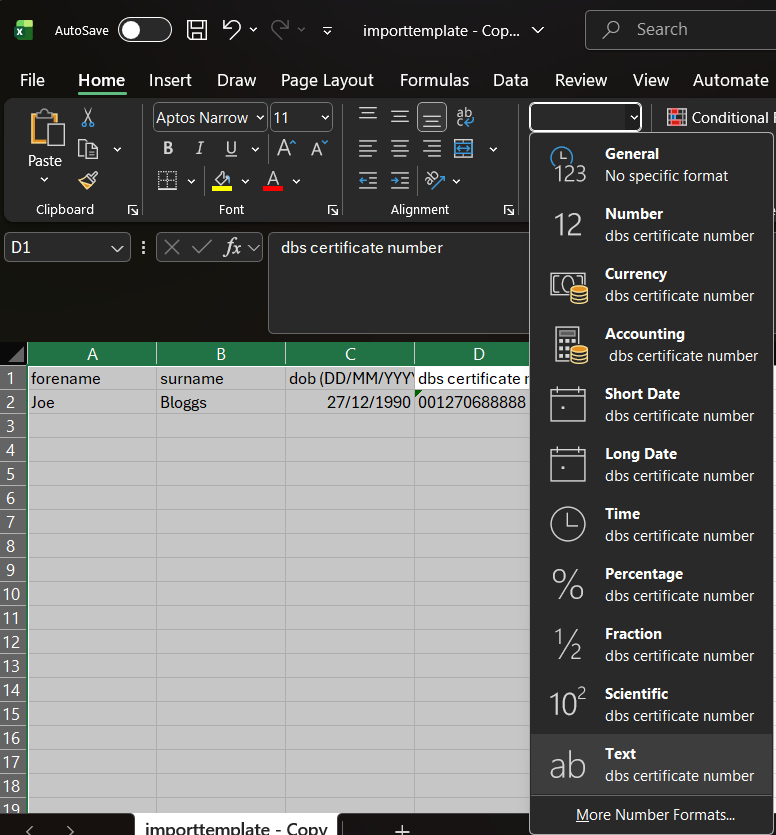
Using Microsoft Excel, populate the CSV with your status check recipients.
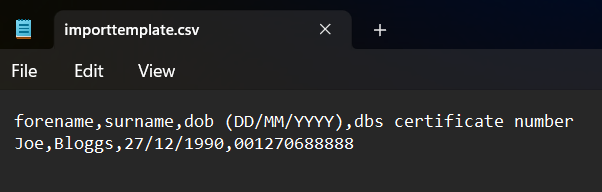
Important: Microsoft Excel often converts dates to integers (e.g. 27/11/1990 becomes 33234) and removes the zero from the start of numbers (e.g. 0078206 becomes 78206). Therefore, before you populate the file, you must convert columns A to D into “Text” format instead of allowing Excel to auto assign format types. Before uploading your CSV, review with “Notepad” and ensure that the dates look correct and the certificate numbers are not missing any zeros.


Upload, Process, Export
- Provide your organisation name along with your name and check the box confirming you have permission from the recipients for this status check.
- Upload the file and hit process.
- You should see the recipients along with their status check results very quickly appear.
- Once the process is complete, you can export the list back to CSV with the results.
Check results:
The result will follow up with one of the following:
| Result | Status Checking Response | Meaning |
|---|---|---|
| ‘BLANK_NO_NEW_INFO’ | ‘This DBS certificate did not reveal any information and remains current as no further information has been identified since its issue’. | The individual’s DBS certificate contains no criminal record information and no new information has come to light since its issue |
| ‘NON_BLANK_NO_NEW_INFO’ | ‘This DBS certificate remains current as no further information has been identified since its issue’ | The individual’s DBS certificate contains criminal record information, but no new information has come to light since its issue. |
| ‘NEW_INFO’ | ‘This DBS Certificate is no longer current. Please apply for a new DBS check to get the most up-to-date information’. | The individual’s DBS certificate should not be relied upon as new information is now available. You should request a new DBS certificate. |
| ‘NO_MATCH_FOUND’ | ‘Certificate not found’ | The certificate number, surname or dob combination was not found, ensure these are correct and that the Standard/Enhanced DBS certificate exists and is enrolled on the Update Service. Basic DBS checks cannot enrol for the Update Service and will not work. |
Sign up for more free tools
If you found this service useful, sign up below and we will let you know when new tools become available.
Our promise: absolutely no spam, only useful new features and tools.